
A used computer is worth buying when it runs the software you need, has enough memory and storage, and leaves room in your budget for the equipment you will actually use. For Bristol students, home workers and families, a desktop can be better value than a laptop if it stays at a desk. A laptop is worth paying more for when you need to carry it every day.
Important buying disclaimer: This guide is for general information and comparison only. Every buyer’s needs, budget and preferences are different. The final choice is entirely yours. Check the live product listing for the exact price, stock, condition, battery details, accessories, warranty and return rights before ordering.
Quick comparison: what can your budget buy?
These are examples from our catalogue checked on 14 November 2026, not promises of future availability. The budget bands are planning ranges rather than market-wide price estimates.
| Budget | What to consider | Main limitation |
|---|---|---|
| £0–£200 | Dell OptiPlex 3040 mini PC — £195, in stock when checked | Older hardware; operating system support needs checking |
| £200–£500 | Lenovo Legion Go — £450, in stock when checked; or look for a conventional used laptop | Handheld gaming PC needs extra equipment for desk work |
| £500+ | Consider a newer Windows laptop or Apple Silicon MacBook with 16GB memory | Illustrative target, not a confirmed in-stock offer |
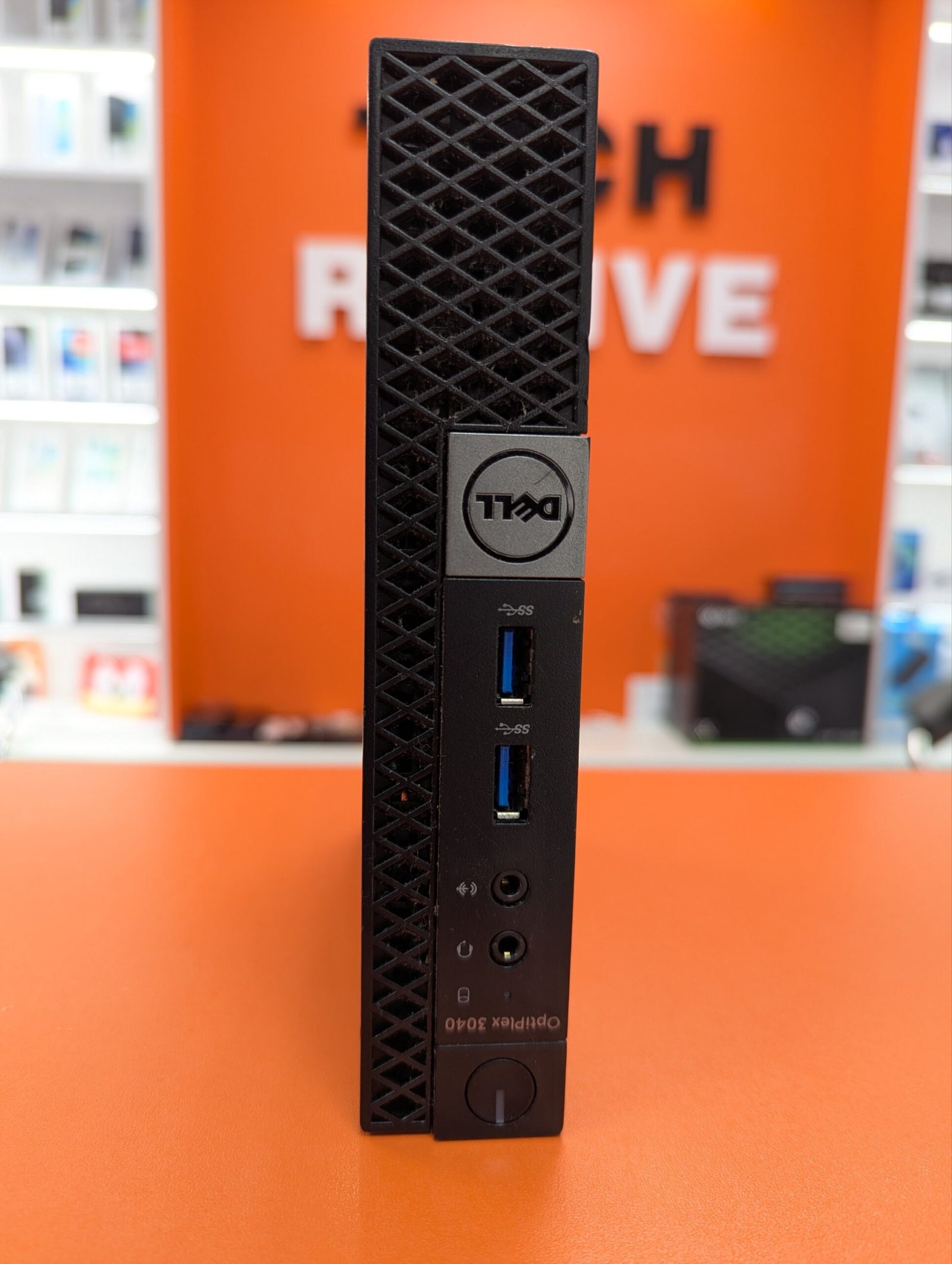
Under £200: a desktop for a fixed workspace
The Dell OptiPlex 3040 listing describes an Intel Core i7, 8GB RAM and 256GB storage. It is a compact desktop rather than a laptop, so you will need a monitor, keyboard and mouse. If you already own those, it could be an economical option for offline documents or other compatible light tasks.
The important caveat is age. The OptiPlex 3040 belongs to an older generation of PCs. A Core i7 label alone does not tell you how fast or secure a computer is. Ask for the exact processor and check it against Microsoft’s Windows 11 requirements. Standard Windows 10 support ended on 14 October 2025; eligible extended security updates are a separate arrangement, not a guarantee supplied with this PC. Do not buy an unsupported computer for sensitive online work simply because it is cheap. A supported Linux distribution may be an alternative if your applications and peripherals work with it.
At £195, a £200 budget leaves only £5 for extras. If you need a screen and peripherals, compare the complete setup cost with a laptop before ordering. Confirm whether the storage is an SSD, which display outputs are fitted, whether Wi-Fi is included and whether a power supply is provided.
£200–£500: portability or a specialist device?
For essays, spreadsheets, video calls and browsing, a conventional used laptop with a supported operating system, a comfortable keyboard and a working webcam is often the simplest choice. Aim for 16GB RAM if you keep many browser tabs open; 8GB can still suit lighter workloads. A 256GB SSD is a reasonable starting point, but 512GB is more comfortable for large files.
Our Lenovo Legion Go is a different proposition: a handheld PC listed with 16GB RAM and 512GB SSD. At £450 it may appeal to someone who mainly wants portable PC gaming and occasionally connects to a desk setup. It is not a direct replacement for a laptop with a built-in keyboard. Budget for a compatible keyboard, mouse, stand or dock if needed, and check whether your games support the hardware and operating system. Battery runtime can vary substantially with game settings.
For Mac buyers, our 2020 MacBook Pro Grade B is currently out of stock. It is a useful example of why model year is not enough: 2020 MacBook Pro models include both Intel and M1 versions. Their software compatibility, performance and future support differ. Do not assume this listing is M1; ask for the exact chip, memory and storage if it becomes available.
£500 and above: spend on useful life, not just a premium badge
For a computer you expect to use for several years, prioritise supported software, 16GB memory or more where your workload warrants it, and a battery in good condition. A newer Apple Silicon MacBook may suit students and creative users who rely on macOS. A supported Windows laptop may be better for specialist course software, certain business tools or Windows-only games. Check your university or employer’s requirements before choosing.
These are shopping targets, not claims that Tech Revive has those exact configurations available today. For video editing, check the application’s recommended memory, GPU and storage requirements. For everyday documents, paying extra for a gaming GPU or a premium display may offer little benefit. Compare the total cost over your expected ownership period, including a possible battery replacement, charger and software subscriptions.
Seven checks before buying a pre-owned computer
- Exact model and processor: ask for the model identifier and full CPU name, not just Core i7 or MacBook Pro.
- Software: check supported operating systems, required applications, security updates and any licence costs.
- Battery: for portable devices, ask for battery health, cycle count where available and any charging faults. A cosmetic grade is not a battery guarantee.
- Screen and input: check dead pixels, hinges, keyboard layout, trackpad and webcam. For accessibility, consider text scaling, screen-reader compatibility and whether the keyboard is comfortable.
- Storage and memory: confirm capacity, SSD type and whether upgrades are possible. Many modern laptops have soldered memory.
- Ownership and setup: confirm the computer is free of previous-owner account locks, firmware passwords and organisational management restrictions.
- Condition and accessories: ask about marks, ports, charger and any known repairs. Read the condition grading guide and individual listing.
Keep your purchase useful for longer
Install supported security updates, maintain a backup of important files and keep ventilation openings clear. Use a suitable charger and avoid leaving a portable computer in a hot car. Check storage periodically rather than filling the drive completely. If a battery becomes swollen, stop using the device and seek professional advice. These habits matter more than chasing the newest processor for routine work.
Buying from Tech Revive in Bristol
Tech Revive is an independent local shop at 73 Broadmead, Bristol BS1 3DX. Our published quality-check process describes checks appropriate to each device type; ask the team which checks and condition details apply to your chosen unit. Eligible devices normally include a 12-month limited warranty for covered technical faults unless otherwise stated. Normal battery wear and accidental damage are excluded from that warranty, which does not replace statutory rights.
Read the product warranty, returns and refunds policy and delivery information. Most eligible online purchases can be cancelled within 14 days of receipt, with a further 14 days to return the goods. The Consumer Rights Act 2015 also protects buyers of faulty or misdescribed goods, including used goods, taking account of their age, price and disclosed condition. Standard UK delivery is advertised as free for orders of £80 or more; check checkout for the actual service. Collection is available only where offered; wait for confirmation before travelling.
Frequently asked questions
Is 8GB RAM enough for a used laptop?
It can be enough for light documents and browsing on a supported system. Choose 16GB if you regularly multitask, and check whether memory can be upgraded later.
Should I buy an Intel MacBook or an M1 MacBook?
For many everyday users, M1 is a sensible starting point, but verify macOS and application compatibility. Some specialist Intel-only workflows may need a different solution. Check the exact model rather than relying on the year.
Can a mini PC replace a laptop?
Yes for a fixed desk, if it supports your software and you have the necessary screen and peripherals. It is not portable in the same way and usually has no battery.
Does Grade B mean poor performance?
No. It generally describes visible cosmetic wear. Functional limitations and battery condition should be described separately. Ask about the individual device before paying.
Browse current Tech Revive stock or contact our team with your budget and required software.